
8 Best Shopify Pre-Order Apps (2026)

The best Shopify pre-order apps in 2026 let you sell products before they are in hand, sold-out restocks, upcoming launches and made-to-order goods, so you capture demand and cash instead of losing the sale to an out-of-stock page. They do four jobs: a pre-order button that replaces Add to Cart, pre-sale campaigns for launches, partial deposits so buyers pay some now, and back-in-stock waitlists for restocks. PreOrder Globo and STOQ are the top all-rounders, Downpay and PreProduct lead on deposits, and Notify Me! owns restock alerts. We do not make a pre-order app, so this is a neutral roundup ranked on merit.
Key takeaways
- Pre-order and back-in-stock are different strategies. Pre-order sells the item now and fulfills later, capturing cash and commitment. A back-in-stock waitlist captures demand and sells only once you restock. Many apps do both, but decide which you actually want.
- For an all-in-one pre-order and restock app, PreOrder Globo and STOQ lead on rating and review depth, both with free plans. For a top-rated restock waitlist specifically, Notify Me! is the most-reviewed.
- Charging full price upfront for a pre-order that ships weeks out carries real risk with card processors and consumer-protection rules. Taking a deposit or using delayed payment capture, with Downpay or PreProduct, is safer and converts better.
- Shopify's built-in "continue selling when out of stock" is not a pre-order tool: it oversells silently with no pre-order messaging, ship dates or deposits. Ratings and pricing here are read from the live App Store as of August 2026.
On this page
What a pre-order app does
When a product is sold out or not yet released, the default Shopify behavior is a dead end: the Add to Cart button disappears and the visitor leaves. A pre-order app turns that moment into a sale. It does one of four jobs.
A pre-order button replaces Add to Cart with Pre-order on out-of-stock or upcoming products, adds a ship-date or expected-availability message, and lets the order through so you fulfill it when stock lands.
Pre-sale campaigns build a launch around a not-yet-released product: a countdown, limited pre-order quantities and marketing hooks that turn anticipation into early revenue.
Partial deposits let a buyer commit with a deposit now and pay the balance when the item ships, which lowers the barrier on higher-priced pre-orders and reduces your risk on long lead times.
Back-in-stock waitlists are the alternative when you would rather not sell before you can ship: shoppers leave their email or phone number and get an alert the moment the item returns, so the demand is captured either way.
Which pre-order job is yours
Name your main goal and match it to a row.
| Your goal | Best pick | Why |
|---|---|---|
| Pre-order and restock in one app | PreOrder Globo or STOQ | Both cover pre-orders and back-in-stock, with free plans. |
| Take a partial deposit | Downpay | Charge a deposit now and the balance when it ships. |
| Run a serious pre-launch campaign | PreProduct | Delayed capture, deposits and pre-order marketing. |
| Only capture back-in-stock demand | Notify Me! | The most-reviewed restock waitlist with email and SMS. |
| Just need a simple pre-order button | Preorder Wolf | A reliable button with flat, predictable pricing. |
How we ranked these
We do not make a pre-order app, so nothing on this list is ours and there is no bias to disclose. We ranked on how well each app handles its core job, whether it covers pre-orders, deposits, campaigns and restock alerts, how it manages payment timing and risk, rating and review depth, and price. We treat deposit and delayed-capture support as a real advantage, because charging full price on a long pre-order is where stores get into trouble. Ratings and pricing are read from the live Shopify App Store as of August 2026.
The 8 best pre-order apps compared
| App | Rating | Reviews | Price | Best for |
|---|---|---|---|---|
| PreOrder Globo | Back in Stock | 4.9 | 1,814 | Free plan available | All-in-one pre-order and restock |
| Preorder, Back In Stock - STOQ | 5.0 | 3,472 | Free plan available | Top-rated all-rounder |
| PreOrder Now Back in Stock WOD | 4.5 | 980 | Free plan available | An established all-rounder |
| PreProduct next-gen pre-order | 4.9 | 101 | Free to install | Advanced campaigns and delayed capture |
| Notify Me! Back in Stock Alert | 4.9 | 3,515 | Free plan available | Back-in-stock waitlists |
| Downpay: Partial Pay & Deposit | 5.0 | 82 | From $29/mo | Partial deposits |
| Amp Back in Stock | Preorder | 4.9 | 828 | Free plan available | Restock alerts with pre-order |
| Preorder Wolf | Pre order now | 4.8 | 499 | Free plan available | A simple pre-order button |
Ratings and pricing verified from live listings, August 2026. Most apps here have free plans; deposit and delayed-capture features often sit on paid tiers.
The apps, ranked
1. PreOrder Globo | Back in Stock

PreOrder Globo, by Globo.io (4.9 across more than 1,800 reviews), is the best all-in-one pick. It swaps Add to Cart for a pre-order button on sold-out and upcoming products, adds ship-date messaging, supports partial payments and discounts, and captures back-in-stock signups, all with a usable free plan.
Strengths: a deep review base at a 4.9, genuinely covers both pre-orders and restock alerts, and offers partial-payment and discount options without jumping to a premium price.
Watch-outs: doing several jobs means more settings to configure, and the most advanced features sit on paid tiers.
Best for: most stores wanting pre-orders and back-in-stock in one app. Free plan available.
2. Preorder, Back In Stock - STOQ
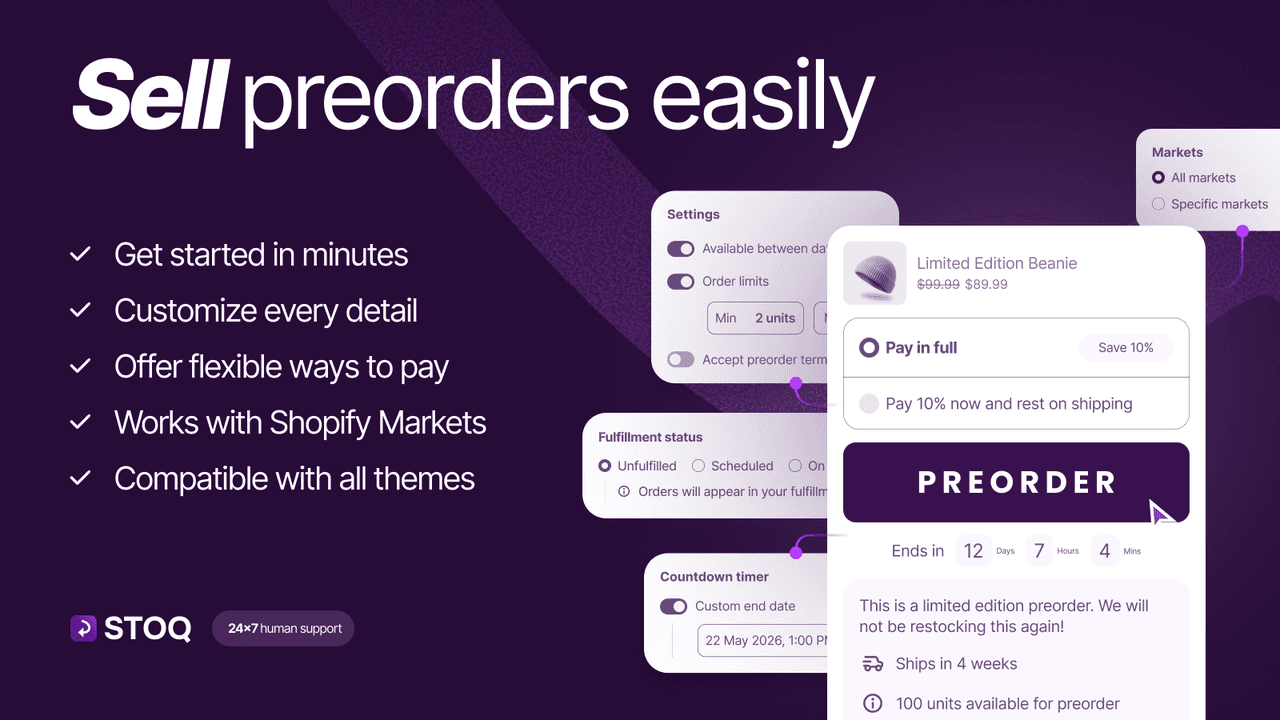
STOQ, by Artos Software (5.0 across roughly 3,470 reviews), pairs a near-perfect rating with one of the deepest review bases in the category. It runs pre-orders and back-in-stock alerts across email, SMS and push, with a clean setup and a strong free plan.
Strengths: a 5.0 across thousands of reviews, multi-channel restock alerts, solid pre-order support and responsive help make it the safest all-rounder.
Watch-outs: its heritage is back-in-stock, so if your priority is complex deposit-based pre-selling, check the pre-order tier features first.
Best for: stores wanting the highest-rated pre-order and restock combo. Free plan available.
3. PreOrder Now Back in Stock WOD

PreOrder Now, by Website on Demand Studio (4.5 across roughly 980 reviews), is a veteran pre-order app with pre-order buttons, badges, partial payments, discounts and back-in-stock alerts, and a large install base built over years.
Strengths: a mature, full-featured pre-order toolkit with partial payments and mixed-cart handling, backed by a large user base.
Watch-outs: a lower rating than the top two here, and some reviewers note a learning curve, so test the flow before a big launch.
Best for: stores wanting a proven, feature-rich pre-order app. Free plan available.
4. PreProduct next-gen pre-order
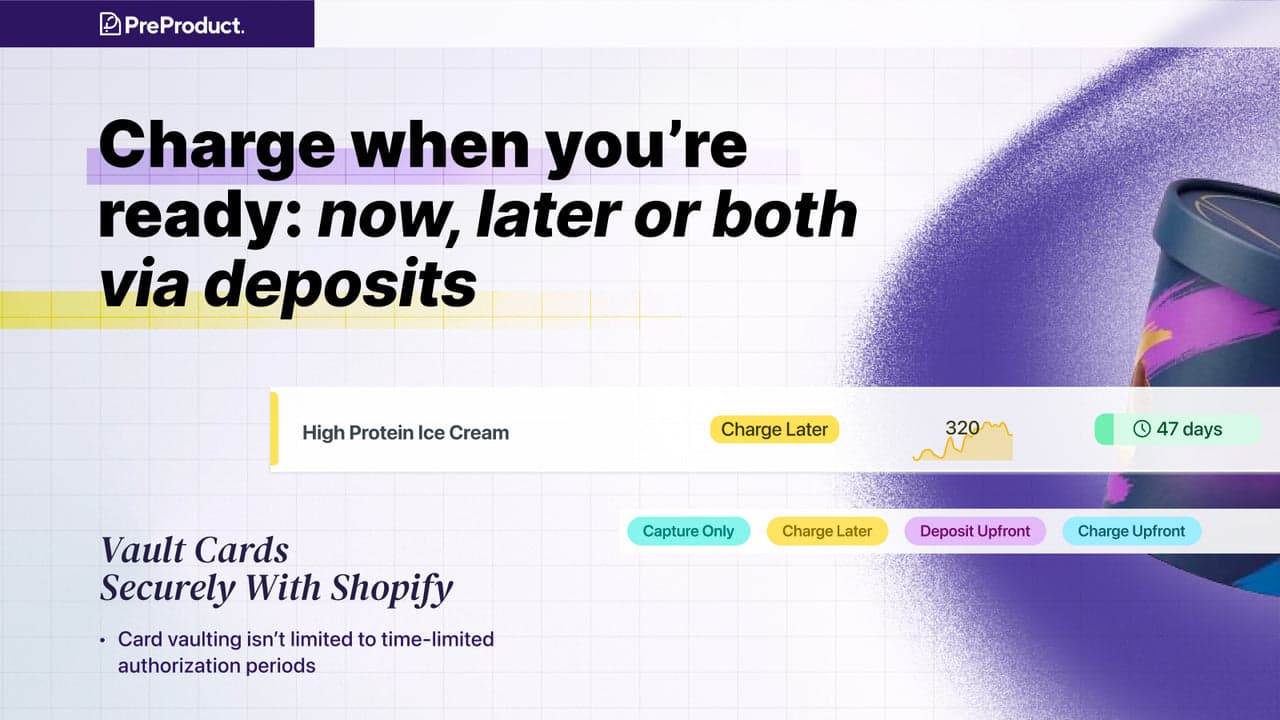
PreProduct (4.9 across roughly 100 reviews) is the choice for brands running real pre-launch campaigns. It supports delayed payment capture, deposits, pay-later and front-loaded pre-orders, plus pre-order marketing tools, so you can gauge demand and take money on your own timeline.
Strengths: the most flexible payment timing here, capture later, deposit or charge now, alongside campaign tools built specifically for launches.
Watch-outs: a smaller review base than the volume leaders, and the flexibility means more decisions to make. It is free to install with paid usage.
Best for: brands running structured pre-launches who need delayed capture. Free to install.
5. Notify Me! Back in Stock Alert

Notify Me! Back in Stock Alert (4.9 across more than 3,500 reviews) is the restock-waitlist leader by review depth. When an item sells out, it collects email and SMS signups and sends an automatic alert the instant it returns, recovering demand you would otherwise lose.
Strengths: the deepest review base for restock alerts, reliable email and SMS notifications, and a free plan, making it the default if the waitlist is your main job.
Watch-outs: it is restock-focused rather than a full pre-order engine, so pair it with a pre-order app if you also need to sell before stock arrives.
Best for: stores that mainly need a back-in-stock waitlist. Free plan available.
6. Downpay: Partial Pay & Deposit
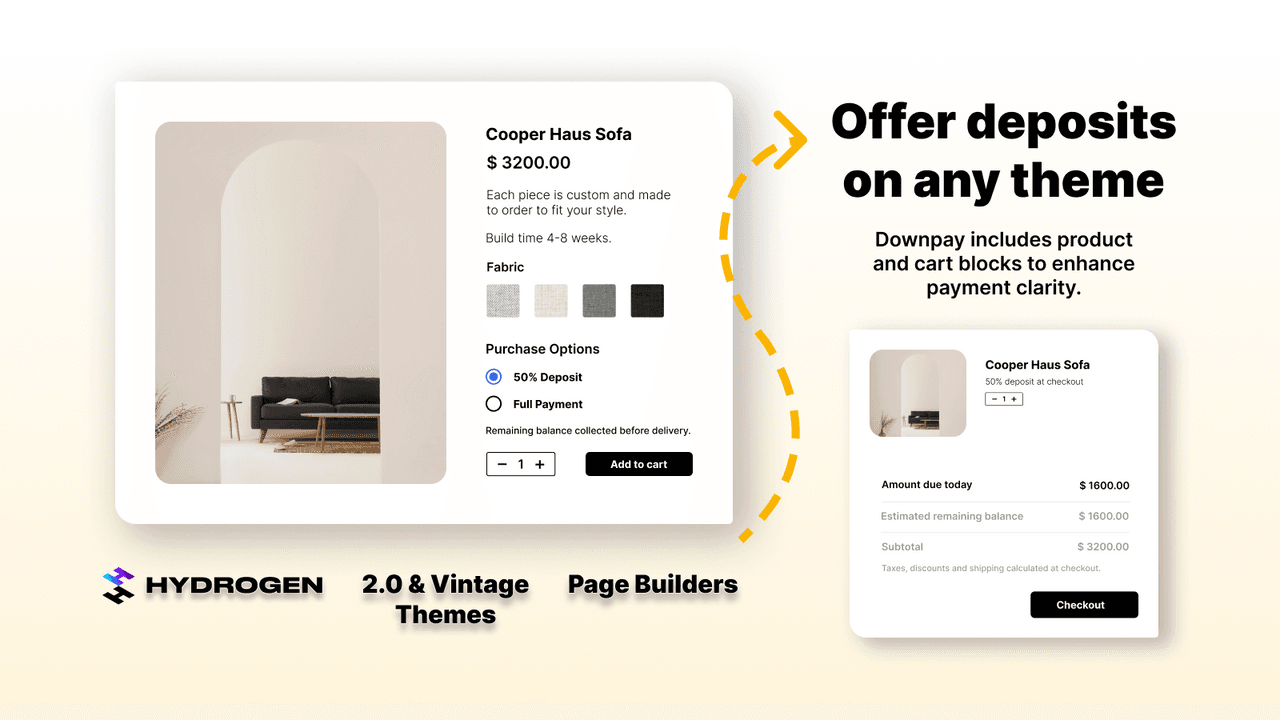
Downpay (5.0 across roughly 80 reviews) does one thing extremely well: partial payments. It charges a deposit at checkout and automatically collects the balance later, which is the safest way to run higher-priced pre-orders and made-to-order sales.
Strengths: a 5.0 rating and a focused, reliable deposit engine with automatic balance collection, reducing the risk of charging full price far ahead of shipping.
Watch-outs: it is a deposit tool, not a full pre-order button and campaign app, and it starts at $29 a month, so it suits stores whose need is specifically partial payment.
Best for: higher-priced or made-to-order pre-orders that need deposits. From $29/mo.
7. Amp Back in Stock | Preorder

Amp Back in Stock, by HEL SG (4.9 across more than 800 reviews), is a well-rated restock and pre-order app that sends back-in-stock alerts and supports pre-order buttons, positioned as a lighter, marketing-friendly alternative to the biggest apps.
Strengths: a high rating on a solid review base, clean restock alerts with pre-order support, and integrations with email and marketing tools.
Watch-outs: a smaller base than STOQ or Notify Me!, so compare the exact pre-order features you need against the leaders.
Best for: stores wanting restock alerts with pre-order in a lighter package. Free plan available.
8. Preorder Wolf | Pre order now
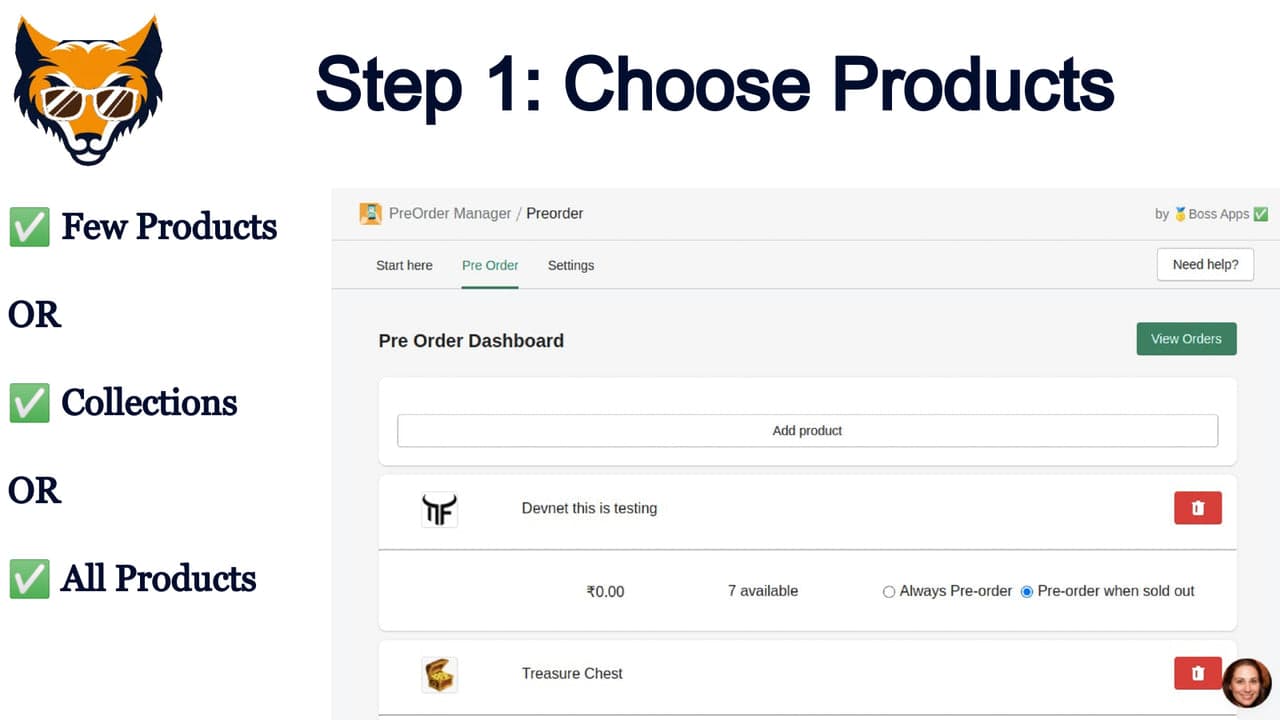
Preorder Wolf, by Boss Apps (4.8 across roughly 500 reviews), keeps it simple: a reliable pre-order button with automatic tagging and flat, predictable pricing, for stores that want pre-orders working without a lot of configuration.
Strengths: straightforward setup, a solid 4.8 rating, and flat pricing that does not scale with orders, which suits higher-volume stores that want cost certainty.
Watch-outs: fewer campaign and deposit features than the top all-rounders, so it is best when you truly just need the button.
Best for: stores wanting a simple, predictable pre-order button. Free plan available.
Which pre-order app to choose
Best all-rounder: PreOrder Globo, pre-orders and restock in one, with a free plan.
Best top-rated combo: STOQ, a 5.0 across thousands of reviews.
Best for deposits: Downpay, deposit now and balance on ship.
Best for launch campaigns: PreProduct, with delayed capture.
Best for restock waitlists: Notify Me!, the most-reviewed.
Which pre-order app fits your store?
Pick the pre-order job that matters most and we will point you to the best fit. We do not make a pre-order app, so every pick here is chosen on merit.
Common pre-order mistakes
Using Shopify's "continue selling when out of stock" as a pre-order. That setting oversells silently, with no pre-order label, ship date or deposit, so customers think the item is in stock and are surprised by delays. Use a real pre-order app that sets expectations.
Charging full price on a long pre-order. Taking full payment for something that ships weeks out can trigger card-processor scrutiny and consumer-protection issues. Use a deposit or delayed capture so you are not holding cash for undelivered goods.
Not setting a clear ship date. A pre-order without an expected date breeds where-is-my-order tickets and chargebacks. Always show a realistic availability date and update it if it slips.
Confusing pre-order with back-in-stock. Selling now and fulfilling later is different from waitlisting a restock. Pick the strategy that matches your inventory reality, and use the app built for it.
Forgetting mixed carts. When a cart holds one in-stock and one pre-order item, decide whether to ship together or separately, and make sure the app and your fulfillment agree, or you will split shipping costs unexpectedly.
Think your app belongs on this list?
We review submissions against the same criteria we rank on and add the ones that qualify. If you build a Shopify app in this category, send it in.