
8 Best Shopify Product Display Apps (2026)
Last updated: April 2026 · Pricing and ratings verified from live Shopify App Store listings on April 30, 2026. Reviewed by the Libautech team — builders of Built for Shopify apps used by 5,000+ merchants across 50+ countries.
Key Takeaways
- "Product display" is not one job — it is three. Product page tabs and accordions (Easy Tabs, Tabs Studio, FOLDER, Trusted Product Tabs AI, Advanced Product Tabs), size charts and fit guides (Kiwi Size Chart, Avada Size Chart), and quick view enhancements (Smartviewer). Most stores need one app from one of these three layers, not three from the same layer.
- Easy Tabs by NexusMedia (4.9 stars, 433+ reviews, $5/month) is the most-reviewed dedicated product tabs app on the Shopify App Store — 12 years of merchant track record, WCAG 2.0 compliant, integrations with reviews and cross-sell apps. The default pick for most stores wanting tabs.
- Tabs Studio by Station offers a free plan and auto-generates tabs from existing heading tags in product descriptions — the strongest no-cost starting point for stores with already-formatted long descriptions that need automatic conversion to tabs.
- For sized apparel and footwear stores, Kiwi Size Chart & Recommender (4.9 stars, 1,800+ reviews) is the category leader with body-measurement-based size recommendations — reduces sizing returns 20–40% in apparel categories where wrong-size returns are the dominant return reason.
- Long product descriptions hurt mobile conversion rates. Stores running a tab or accordion layout on mobile typically see 5–15% lower bounce rates on product pages because customers can scan key information (shipping, sizing, materials, FAQ) without infinite scrolling. Tabs are a mobile-first conversion mechanic, not just a desktop polish layer.
- Product display tabs stack with reviews apps, size chart apps, and shipping calculators — modern tab apps include integrations to surface third-party app content as dedicated tabs (Reviews tab, Shipping tab, Size Chart tab). The right tab app turns disconnected apps into one coherent product page experience.
Who Needs a Product Display App, and Why?
A product display app improves how information appears on the product page: tabbed descriptions that tidy long content, size charts and fit guides that cut returns, and quick-view that lets shoppers preview a product without leaving the collection. Clearer pages answer questions in place, which reduces hesitation and returns.
You need one if your product pages carry a lot of detail, you sell apparel or anything with sizing, or shoppers ask the same questions repeatedly. Simple, single-detail products may not need it.
The Three Jobs of Shopify Product Display Apps
Most roundups of Shopify product display apps list 10 tools side by side as if they competed directly. They do not. A product description tabs app, a size chart app, and a quick view popup app solve completely different product page problems for different store categories. Lumping them together makes it impossible to decide what to install — or to recognize that "product display" is a category umbrella covering three distinct sub-categories that rarely overlap.
The honest framing: Shopify product display apps break into three jobs, each with its own use case and target store profile.
The first job is product page tabs and accordions — organizing long product descriptions into tabbed or accordion layouts so customers can scan key information without infinite scrolling. Easy Tabs, Tabs Studio, FOLDER Smart Product Tabs, Trusted Product Tabs AI, and Advanced Product Tabs are the leaders here. This is the dominant product display sub-category and the right starting layer for most stores with detailed product descriptions, especially in categories where shipping info, materials, sizing, or FAQ content meaningfully impacts the buying decision.
The second job is size charts and fit guides — sizing-specific display tools for apparel, footwear, and other size-sensitive product categories. Kiwi Size Chart & Recommender, Avada Size Chart, and Smart Size Chart lead this layer. The mechanic is real: 60–70% of apparel returns are sizing-related, and a properly configured size chart with measurement-based recommendations reduces those returns by 20–40% on stores at meaningful return volume. This is the right layer for sized product categories where sizing accuracy is the primary friction in the buying decision.
The third job is quick view and product page enhancements — popup quick view widgets, sticky product info bars, image zoom, 360° viewers, and other layered enhancements to the product page. Smartviewer Quick View leads this layer on Shopify. This is the right layer for stores with image-heavy catalogs (fashion, jewelry, home decor) where customers want to preview product details from collection pages without navigating to individual product pages.
This post ranks 8 apps across the three jobs based on verified April 2026 Shopify App Store data and what each one actually solves.
Product display apps stack with broader product page tools. See our guides on best Shopify product add-ons apps for the customization and warranty add-on layer that complements organized product information, best Shopify page builder apps for stores rebuilding entire product pages with custom sections, and best Shopify cart customization apps for the post-add-to-cart layer that picks up where the product page leaves off.
Quick Comparison: 8 Best Shopify Product Display Apps (2026)
| App | Rating | Free Plan | Paid From | Layer | Best For |
|---|---|---|---|---|---|
| Easy Tabs – Product Tabs | ⭐ 4.9 (433+) | No (trial) | $5/mo | Product tabs | Most-reviewed product tabs app, integrations |
| Kiwi Size Chart & Recommender | ⭐ 4.9 (1,800+) | Yes | $6.99/mo | Size chart | Apparel and footwear with fit recommendations |
| Tabs Studio | ⭐ 4.9 (300+) | Yes | $9.99/mo | Product tabs | Auto-generates tabs from heading tags, free |
| FOLDER – Smart Product Tabs | ⭐ 4.6 (329+) | Yes | $5/mo | Product tabs | Visual Editor with shared and specific tabs |
| Trusted Product Tabs with AI | ⭐ 5.0 (97+) | Yes | $6.99/mo | Product tabs | Built for Shopify with AI tab generation |
| Advanced Product Tabs | ⭐ 4.9 (200+) | Yes | $4.99/mo | Product tabs | HTML, metafields, multi-language, older themes |
| Avada: Size Chart, Size Guide | ⭐ 4.9 (250+) | Yes | $4.99/mo | Size chart | Free size charts with multi-language support |
| Smartviewer Quick View | ⭐ 4.9 (200+) | Yes | $3.99/mo | Quick view | Quick view popups from collection pages |
Layer 1: Product Page Tabs and Accordions
This is the dominant product display sub-category and the right starting layer for most stores. The job is converting long-form product descriptions into tabbed or accordion layouts so customers can scan key information (shipping, sizing, materials, FAQ, returns) without infinite scrolling on mobile. Five apps lead this layer, each with slightly different positioning around design control, automation depth, and feature mix.
1. Easy Tabs – Product Tabs
Best for: most Shopify stores wanting product description tabs at a budget price point with the longest track record on the Shopify App Store, WCAG accessibility compliance, and integrations with reviews and cross-sell apps — the default pick for the product tabs job.
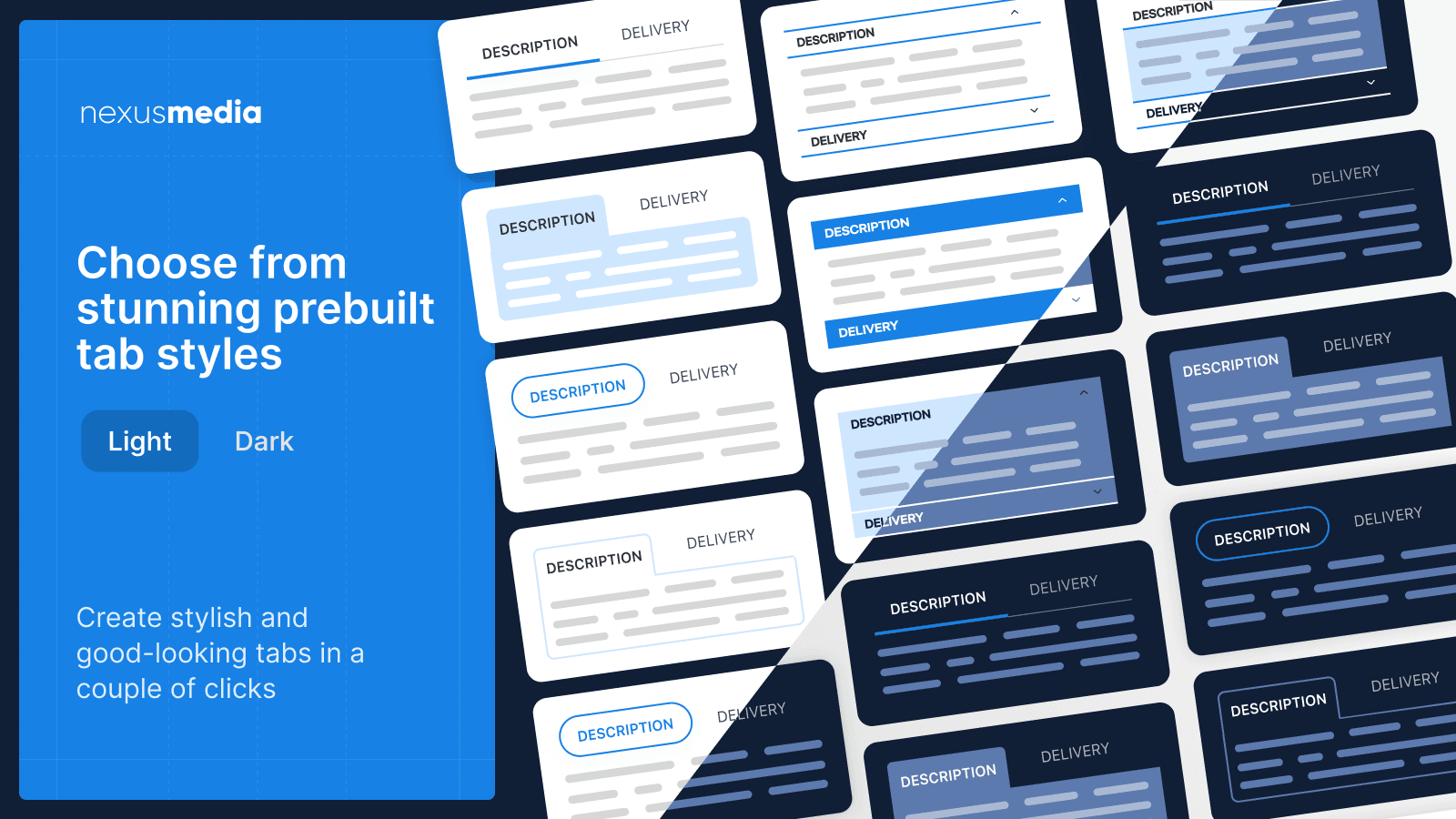
Easy Tabs by NexusMedia holds 4.9 stars across 433+ reviews and has been on the Shopify App Store since 2014. The positioning is mature, dependable product tabs with deep ecosystem integration: tabs split product descriptions at heading tags or applied per-product or per-collection, integrations with popular reviews apps (Reviews tab automatically pulls third-party app content into a dedicated product tab), cross-sell tab integrations, size chart tab integrations, and full WCAG 2.0 / Section 508 compliance for accessibility.
The 12-year track record is the standout strength. Multiple merchants on the Shopify App Store cite using Easy Tabs for 4–7 years — the kind of long-tenure satisfaction that signals an app's stability through Shopify platform changes (Online Store 2.0 migration, theme updates, performance audit standards). The integrations matter for stores running review apps (Judge.me, Loox, Yotpo) or shipping calculator apps where the content needs to surface inside a dedicated product tab rather than as a separate widget.
Pricing starts at $5/month after the free trial, which is competitive with the lower-tier alternatives. The app supports product-specific tabs (different tabs per product) and shared tabs (same tabs across product groups) without per-product configuration overhead, multimedia support inside tabs (images, videos, embedded content), and clean integration with all major Shopify themes including Online Store 2.0.
Where it falls short: no permanent free plan — free trial only, paid commitment required after the trial period. Visual editor depth is functional rather than design-forward compared to FOLDER's pre-built design templates. The 433-review base, while strong, is smaller than apps targeting larger TAMs (Hulk Product Options at 1,875+ reviews for product options).
Pricing: No permanent free plan (free trial available). Paid from $5/month.
2. Tabs Studio
Best for: Shopify stores with already-formatted long product descriptions that want automatic tab generation from existing heading tags — the strongest no-cost starting point with a genuinely useful free plan.
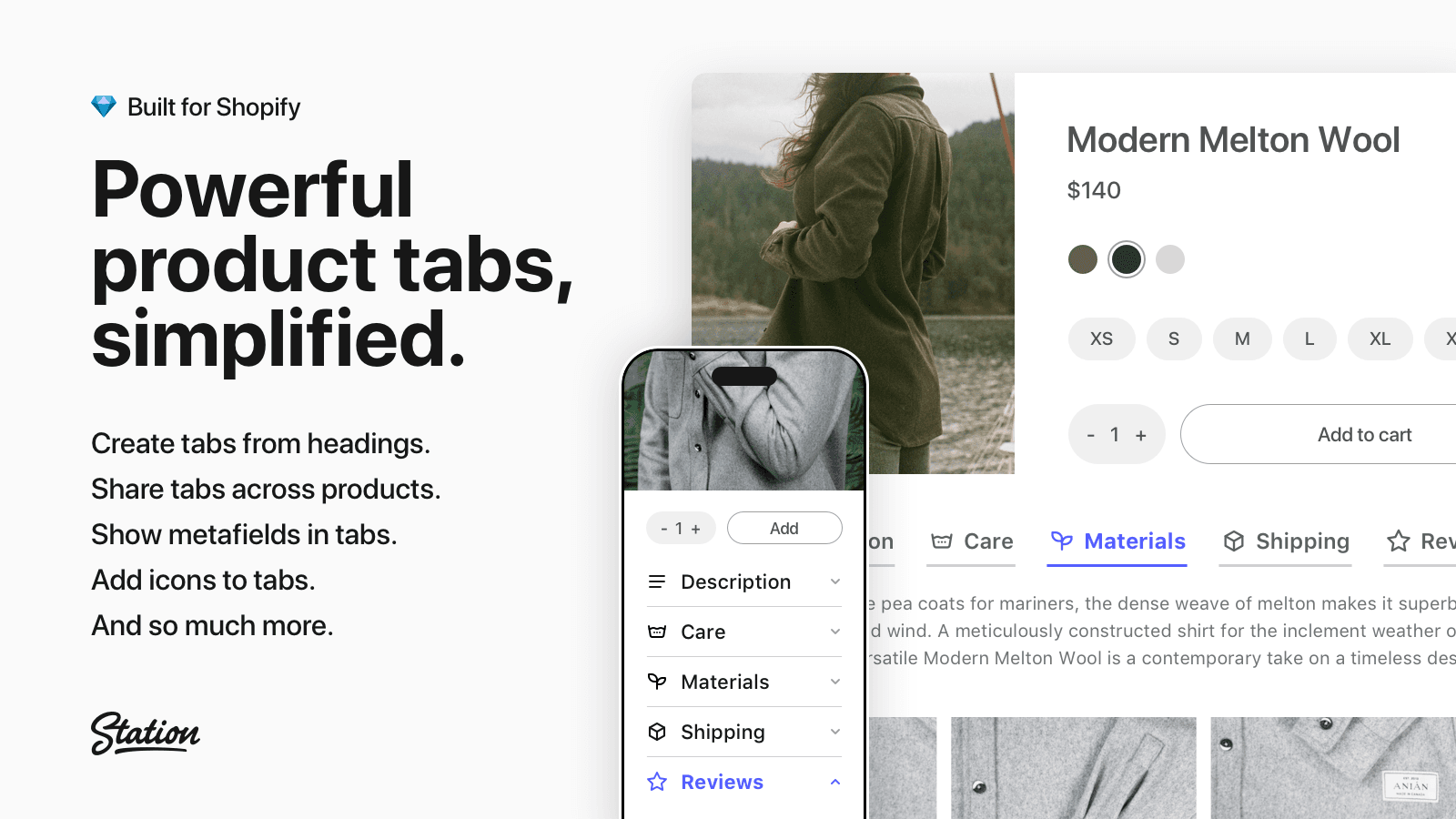
Tabs Studio by Station holds 4.9 stars across 300+ reviews and offers a permanent free plan, which is meaningful for stores still validating whether tabs measurably impact their product page conversion before committing to a monthly subscription. The mechanic that differentiates Tabs Studio from competitors is automatic tab generation: the app reads existing heading tags (H2, H3) inside product descriptions and converts them into tabs without manual configuration. For stores with hundreds of products already formatted with proper heading hierarchy, this saves hours of editorial work.
Shared tab functionality applies the same tab structure across products grouped by collection, tag, type, or vendor — edit once, update everywhere. Standard customization options cover colors, fonts, and tab versus accordion display modes. The app is lightweight (low script weight relative to comparable products) and maintains compatibility with Shopify themes including Online Store 2.0. Strong customer support is consistently flagged in merchant reviews.
Where it falls short: lacks the deep integration ecosystem of Easy Tabs — reviews app integrations, shipping app integrations, and similar third-party tab content require manual configuration rather than out-of-the-box wiring. Visual design templates are less varied than FOLDER's pre-built design library. The free plan covers the core auto-generation feature but advanced customization and shared tab management require the $9.99/month paid tier, which is at the higher end of this layer's pricing.
Pricing: Free plan available. Paid from $9.99/month.
3. FOLDER – Smart Product Tabs
Best for: Shopify stores wanting product tabs with pre-built visual design templates, the strongest design polish in the category, and shared tab management across collections, vendors, and product types.
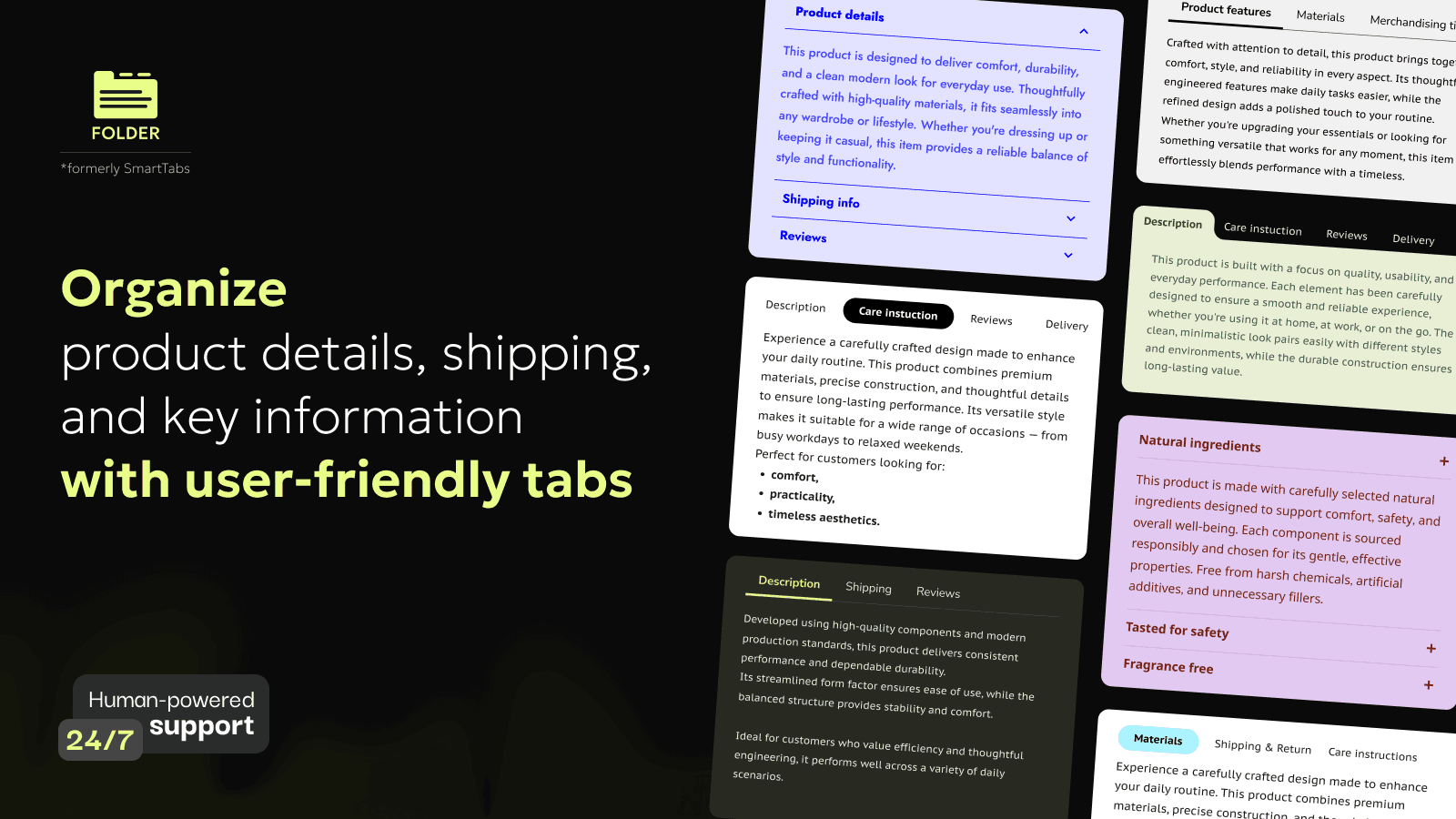
FOLDER by TK Digital holds 4.6 stars across 329+ reviews. The positioning is design polish: pre-built design templates for tabs and accordions, a Visual Editor that lets non-technical merchants customize tab appearance without CSS, and robust third-party app integrations for surfacing review tabs, size chart tabs, FAQ tabs, and shipping tabs. Tabs are fully responsive and Shared Tabs apply the same configuration across products by collection, vendor, type, or tag.
The Visual Editor is the standout feature. Where Easy Tabs and Tabs Studio rely on functional defaults, FOLDER provides a design-first interface that lets merchants match tab styling precisely to their brand. For stores with strong brand guidelines (premium fashion, luxury home goods, design-conscious DTC), FOLDER's polish becomes a real differentiator over functionally-identical tab apps.
Where it falls short: 4.6-star rating is slightly lower than Easy Tabs (4.9), Tabs Studio (4.9), and Trusted Product Tabs AI (5.0). The slightly lower rating reflects some merchant complaints about edge-case theme compatibility issues that took time to resolve. Pricing scales with feature tier, so unlocking the full Visual Editor and shared tab capabilities pushes total cost above the entry-level $5/month tier.
Pricing: Free plan available. Paid from $5/month.
4. Trusted Product Tabs with AI
Best for: Shopify stores wanting AI-powered tab generation with a Built for Shopify badge, ChatGPT-driven product description tab creation, and a one-time-purchase pricing option — the strongest BFS-certified pick in this layer.

Trusted Product Tabs holds 5.0 stars across 97+ reviews and carries the Built for Shopify badge — Shopify's highest performance, design, and integration certification. The app uses ChatGPT-based AI to generate SEO-optimized product tabs and product descriptions automatically, which is meaningful for stores with hundreds of products lacking detailed descriptions or store owners who want consistent description structure across their entire catalog without manual editorial work.
The BFS certification is the differentiator versus the older incumbents in this category. Easy Tabs, FOLDER, and Advanced Product Tabs predate the Built for Shopify program; Trusted Product Tabs is purpose-built to BFS standards from launch. For stores prioritizing performance audit results (Lighthouse scores, Core Web Vitals), the BFS badge guarantees minimal page-speed impact. Theme extensions and asynchronous script loading keep the app's performance footprint near zero.
Some merchants flag that a one-time-purchase option exists alongside the standard recurring subscription, which is unusual in this category and useful for stores that prefer capex-style payments over ongoing operational costs.
Where it falls short: 97-review base is smaller than the established alternatives. AI-generated content quality varies and requires editorial review before publishing — the AI is a first-draft tool, not a finished-content generator. Less mature ecosystem of third-party app integrations than Easy Tabs.
Pricing: Free plan available. Paid from $6.99/month.
5. Advanced Product Tabs
Best for: Shopify stores on older themes (pre-Online Store 2.0) or those needing HTML, metafield, and multi-language tab support — the most flexible technical pick for non-standard theme configurations.
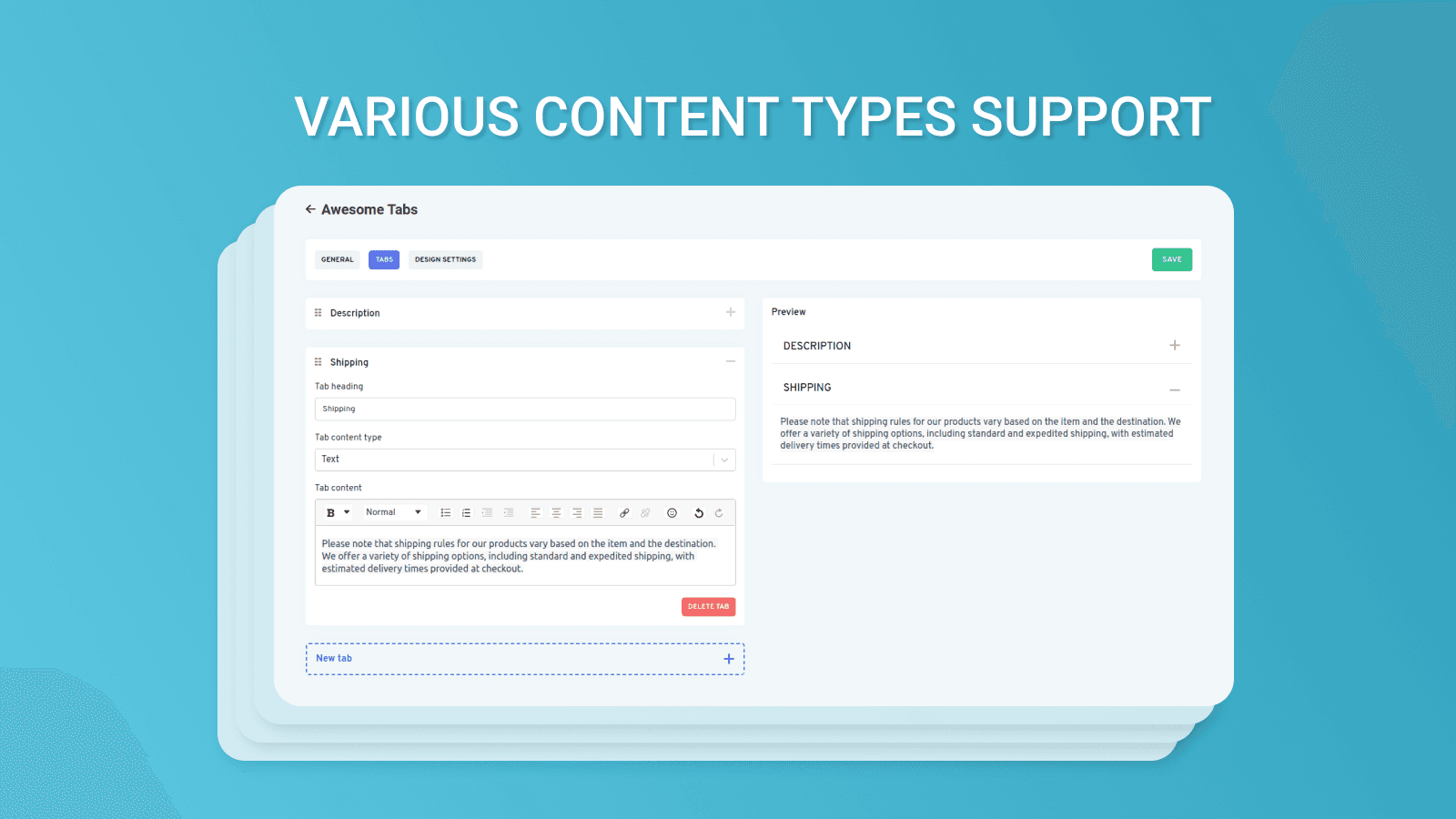
Advanced Product Tabs by Polar Bear Commerce holds 4.9 stars across 200+ reviews and positions for technical flexibility. The app supports both Online Store 2.0 themes and older theme versions (a meaningful differentiator for stores on legacy themes that haven't migrated), full HTML support for custom tab layouts, dynamic tabs and accordions using Shopify metafields for advanced configuration flexibility, and full multi-language support for international stores. WCAG 2.0 compliance is included, matching Easy Tabs.
The metafield-driven dynamic tabs feature is the technical standout. For stores with custom Shopify metafields powering product specifications, ingredient lists, or technical specs, Advanced Product Tabs surfaces metafield content directly into tabs without manual editorial work — the metafield content updates and the tab content updates automatically. This is the kind of advanced workflow that Easy Tabs and Tabs Studio do not handle as cleanly.
Pricing starts at $4.99/month, the lowest paid tier in this layer. The auto-create tab feature splits product descriptions at H2/H3 heading tags similar to Tabs Studio.
Where it falls short: smaller review base than Easy Tabs. Visual design polish is functional rather than design-forward compared to FOLDER. The technical flexibility creates configuration overhead — simple use cases (just give me product tabs) are over-served by the metafield and HTML capabilities, and merchants can find the setup more complex than necessary for basic tab functionality.
Pricing: Free plan available. Paid from $4.99/month.
Layer 2: Size Charts and Fit Guides
This is the right layer for sized product categories — apparel, footwear, lingerie, swimwear, and similar where sizing accuracy is the primary friction in the buying decision. The economics are real: 60–70% of apparel returns are sizing-related, and a properly configured size chart with measurement-based recommendations reduces those returns by 20–40% on stores at meaningful return volume. Two apps lead this layer.
6. Kiwi Size Chart & Recommender
Best for: apparel, footwear, and sized-product Shopify stores wanting body-measurement-based size recommendations alongside traditional size charts — the category leader for size-related conversion improvement and return reduction.
Kiwi Size Chart & Recommender holds 4.9 stars across 1,800+ reviews. The positioning is comprehensive sizing intelligence: traditional size charts with multiple size tables, images, videos, and tabs, plus a body-measurement-based size recommender that asks customers for height, weight, body shape, or fit preference and returns a personalized size recommendation. The recommender is the standout feature — simple size charts assume customers know their measurements; the Kiwi recommender works for the larger population of customers who don't.
Auto-applied size charts attach to products by collection or product attributes, eliminating per-product configuration overhead for catalogs of hundreds of SKUs. Multi-unit conversions (cm to inches, kg to lbs) handle international customers automatically. CSV import for bulk size chart data and webpage scraping for migrating size charts from existing brand sites speed up initial setup significantly.
The 1,800+ review base is the largest in this layer by 7x and reflects Kiwi's established position as the default Shopify size chart pick for apparel brands. Pricing starts at $6.99/month with a free plan available for low-volume stores.
Where it falls short: the size recommender requires careful initial setup — stores need to provide accurate measurement data per product for the recommender to deliver useful recommendations, and incomplete data produces poor recommendations. Smaller stores with under 50 SKUs may find the configuration overhead excessive for the recommendation feature. The free plan limits usage volume.
Pricing: Free plan available. Paid from $6.99/month.
7. Avada: Size Chart, Size Guide
Best for: budget-conscious Shopify stores wanting traditional size charts with multi-language support and the lowest entry pricing in the size chart category.
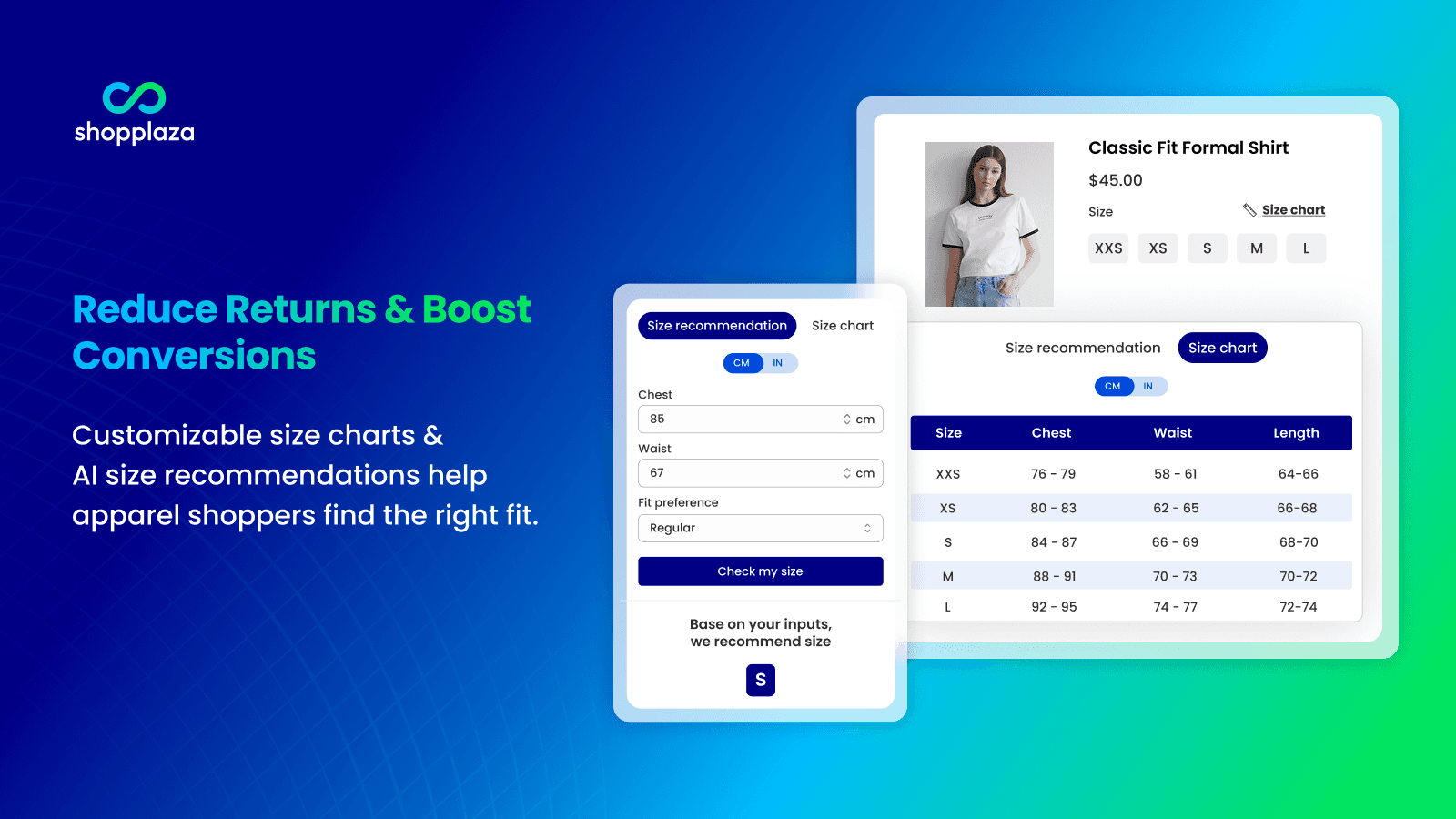
Avada Size Chart & Size Guide holds 4.9 stars across 250+ reviews. The positioning is straightforward, no-frills size chart functionality at the lowest paid pricing in this layer. The app provides a free plan covering basic size chart functionality, multi-language support for international stores, customizable size chart designs to match store branding, and integration with all major Shopify themes including Online Store 2.0.
For stores that don't need Kiwi's body-measurement recommender and just want a clean size chart attached to products by collection or category, Avada delivers comparable functionality at $4.99/month — the lowest paid tier in the size chart category. The brand recognition for Avada (the company runs multiple Shopify apps including SEO and email tools) provides ecosystem familiarity for merchants already using Avada products.
Where it falls short: no measurement-based size recommender — only static size tables. For sized categories where wrong-size returns are the dominant issue, missing the recommendation engine cuts off the largest source of return reduction. The 250-review base is significantly smaller than Kiwi's 1,800+. Setup automation is functional but lacks the bulk import and webpage scraping features Kiwi includes for catalog-scale deployment.
Pricing: Free plan available. Paid from $4.99/month.
Layer 3: Quick View and Product Page Enhancements
This layer is for stores with image-heavy catalogs (fashion, jewelry, home decor, beauty) where customers want to preview product details from collection pages without navigating away to individual product pages. Quick view popups reduce friction in the browse-to-buy journey on collection pages by surfacing core product info (image gallery, price, variants, Add to Cart) inside a popup. One app represents this layer in this guide.
8. Smartviewer Quick View
Best for: Shopify stores with image-heavy collection pages wanting quick view popups that surface product details without navigating to individual product pages — useful for fashion, jewelry, home decor, and beauty stores where customers browse collections rather than search by product name.
Smartviewer by Squirai Technology holds 4.9 stars across 200+ reviews. The app adds quick view popups triggered from collection pages — customers click a quick view button on a product card and a popup surfaces image gallery, product description, price, variant selectors, and Add to Cart without navigating away from the collection page. For collection-page-heavy stores, this reduces the number of page loads in a browsing session, which improves both apparent site speed and conversion rates on stores where customers compare multiple products before purchasing.
Customizable popup design integrates with major themes. Mobile and desktop optimization ensures the popup renders correctly on small screens. Pricing starts at $3.99/month — the lowest entry point in this list — making Smartviewer an easy add-on test for stores that want to validate whether quick view popups measurably impact collection-page conversion before committing to a more expensive solution.
Where it falls short: 200-review base is smaller than market leaders in product display. The functionality is intentionally narrow (quick view only) — stores wanting broader product page enhancements (image zoom, 360° viewers, sticky product info) need separate apps. Quick view popups can create modal stacking conflicts with other popup-based apps (popup email capture, exit-intent offers) on stores running multiple popup-style integrations.
Pricing: Free plan available. Paid from $3.99/month.
Which App to Choose
For most Shopify stores wanting product description tabs with the longest track record and ecosystem integration: Easy Tabs – Product Tabs. 4.9 stars across 433+ reviews, $5/month entry, 12 years of merchant track record, integrations with reviews and cross-sell apps.
For free product tabs with auto-generation from existing heading tags: Tabs Studio. 4.9 stars, free plan available, $9.99/month for advanced features, the strongest no-cost starting point.
For design-polish product tabs with pre-built visual templates: FOLDER – Smart Product Tabs. 4.6 stars, $5/month, Visual Editor with brand-matched design depth.
For Built for Shopify-certified tabs with AI generation: Trusted Product Tabs with AI. 5.0 stars, $6.99/month, BFS badge, ChatGPT-powered tab content.
For older themes and metafield-driven dynamic tabs: Advanced Product Tabs. 4.9 stars, $4.99/month, HTML and metafield support, multi-language compatible.
For sized apparel and footwear with measurement-based recommendations: Kiwi Size Chart & Recommender. 4.9 stars across 1,800+ reviews, $6.99/month, the category leader for size-related return reduction.
For budget size charts with multi-language support: Avada Size Chart & Size Guide. 4.9 stars, $4.99/month entry, free plan available.
For collection-page quick view popups: Smartviewer Quick View. 4.9 stars, $3.99/month, useful for image-heavy fashion and home decor stores.
For most Shopify stores under $500K/month, the honest stack recommendation is one app from Layer 1 (product tabs). Install Easy Tabs at $5/month for the dependable default, or Tabs Studio's free plan if you want to validate tabs measurably impact your product page conversion before paying. Add a Layer 2 size chart app only if you sell sized products (apparel, footwear, lingerie) where sizing returns are a meaningful issue — Kiwi for size-recommendation depth, Avada for budget. Skip Layer 3 (quick view) unless your store is heavily collection-page-driven and customers compare multiple products in a browsing session before purchasing.
The most common product display mistake is installing three or four apps from Layer 1 simultaneously — multiple tab apps create theme conflicts, render the tabs incorrectly, and break product page layouts. Pick one tab app, configure it well, and resist the urge to install a second.
How We Ranked These Apps
This ranking is based on four criteria applied to every Shopify product display app tested in 2026. First, Shopify App Store rating and verified review volume as of April 30, 2026 — the strongest signal of long-term merchant satisfaction at scale. Second, fit-to-job for which of the three layers each app actually solves (product tabs, size charts, or quick view) rather than treating broadly-named "product display" apps as if they competed across all sub-categories. Third, ecosystem integration depth — third-party app integrations for reviews, shipping, size charts, and cross-sell content matters substantively for stores running multi-app product page configurations. Fourth, page-speed and Built for Shopify certification status — product page apps that load synchronously can damage Lighthouse scores and Core Web Vitals, which directly impact both SEO and conversion rates.
Every pricing figure in this post was verified directly from each app's live Shopify App Store listing on April 30, 2026. App pricing structures change — confirm current pricing on the official listing before installing. Ratings and review counts reflect the Shopify App Store at the time of our last update.
Frequently Asked Questions
What does a Shopify product display app do?
A Shopify product display app handles one or more of three jobs. Product page tabs and accordions organize long product descriptions into scannable layouts. Size chart and fit guide apps provide sizing-specific display tools for apparel and footwear with measurement-based recommendations. Quick view popup apps surface product details from collection pages without navigating to individual product pages. Most stores need one app from one of these three jobs, not three from the same job.
What is the best Shopify product display app in 2026?
Depends on the layer. For product description tabs: Easy Tabs (4.9 stars, 433+ reviews, $5/month, the most-reviewed dedicated product tabs app). For free tabs with auto-generation: Tabs Studio (4.9 stars, free plan available). For sized apparel with size recommendations: Kiwi Size Chart & Recommender (4.9 stars, 1,800+ reviews, $6.99/month). For collection-page quick view popups: Smartviewer Quick View (4.9 stars, $3.99/month).
Will product tabs apps slow down my Shopify store?
Built for Shopify-certified apps including Trusted Product Tabs with AI load tab widgets asynchronously with no impact on Core Web Vitals or Lighthouse scores. Older non-BFS apps including Easy Tabs and Advanced Product Tabs have been audited for Shopify performance standards and load lightweight scripts asynchronously — typical impact is under 50ms additional load time. Always test page speed before and after install with Google PageSpeed Insights.
Should I use product tabs or accordions on my Shopify product page?
Tabs work better on desktop where horizontal space is abundant; accordions work better on mobile where vertical scrolling is the natural pattern. Most modern product tabs apps (Easy Tabs, Tabs Studio, FOLDER) support both display modes and can render tabs on desktop while automatically switching to accordions on mobile. For mobile-heavy traffic (over 70% of most Shopify stores), prioritize an accordion-capable tab app and test the accordion layout on actual mobile devices before launching.
How many product tabs should I have on a product page?
Three to five tabs is typical. Fewer than three doesn't justify the tab layout (just use a regular description). More than five overwhelms customers and forces them to hunt for information. Standard tabs to consider: Description, Specifications/Features, Shipping & Returns, Size Guide (apparel), Reviews. For technical product categories (electronics, tools), add a Specifications tab; for service-heavy categories (subscriptions, consulting), add an FAQ tab. The right tab structure mirrors the actual decisions customers make before purchasing.
Do size chart apps reduce returns?
Yes, meaningfully. 60–70% of apparel returns are sizing-related ("too small," "too big," "didn't fit as expected"). A properly configured size chart with measurement-based size recommendations (Kiwi Size Chart) typically reduces sizing returns by 20–40% on stores with meaningful return volume. The economics: a $30 prevented return saves the cost of return shipping, restocking labor, and the discounted resale value of returned merchandise — typically $5–10 in real cost per prevented return. At 50 prevented returns per month, the size chart app pays for itself many times over.
What is the difference between a size chart and a size recommender?
A size chart displays measurement tables (S = chest 36in, M = chest 40in, etc.) and lets the customer match their measurements to a size. A size recommender asks the customer for body measurements, height, weight, or fit preference and returns a recommended size based on those inputs. Size charts assume customers know their measurements; size recommenders work for the larger population of customers who don't. Apps like Kiwi Size Chart include both, while budget alternatives like Avada Size Chart provide only static size charts.
Can I use multiple product display apps simultaneously?
One from each layer is fine and often desirable: one tab app + one size chart app + one quick view app produces no conflicts because the three apps target different parts of the page. Two apps from the same layer (two tab apps, two size chart apps) creates widget conflicts, layout breakage, and inconsistent customer experiences. The most common mistake is installing two tab apps because each one promises slightly different features — pick one, configure it well, and resist the urge to add a second.
Do product display apps work with Shopify Online Store 2.0 themes?
Yes, all current product display apps in this list support Online Store 2.0 themes. Easy Tabs, Tabs Studio, FOLDER, and Trusted Product Tabs are explicitly built for OS 2.0 with theme app extensions. Advanced Product Tabs supports both OS 2.0 and older legacy themes (a useful differentiator for stores on legacy themes that haven't migrated). For stores on Online Store 1.0, plan a theme upgrade — most modern Shopify functionality (Sections Everywhere, app blocks, performance optimizations) requires OS 2.0.
How do product tabs affect SEO?
Tab content remains in the product page HTML and is fully indexable by search engines — the tab UI is a frontend display layer, not a content-hiding mechanism. Modern tab apps (Easy Tabs, Tabs Studio, Advanced Product Tabs) maintain SEO-friendly markup that surfaces tab content in the page HTML rather than loading it dynamically. Older or poorly-built tab apps that load content via JavaScript after page render can hide content from search engines — verify the app preserves tab content in the source HTML before committing.
What is the difference between Tabs Studio and Easy Tabs?
Tabs Studio offers a free plan with auto-generation from heading tags as the standout feature; Easy Tabs is a paid app with the longest track record (12 years on the Shopify App Store) and the deepest ecosystem integrations with reviews and cross-sell apps. For stores validating whether tabs work for their product page before committing to a paid app, Tabs Studio's free plan is the right starting point. For stores already committed to tabs and prioritizing reliability and integration depth, Easy Tabs is the dependable default.
Think Your App Belongs on This List?
We update these lists as new tools launch and existing ones improve. If you are a developer building a Shopify product display, product tabs, size chart, or quick view app and want your app considered for inclusion, submit it here — tell us what your app does, who it is for, and include a link to your Shopify App Store listing. We review every submission.